Upgrading
warning
This only works for 2.x and beyond. You cannot upgrade from 1.x to 2.x, or 2.x to 3.x without changing code. See more about migration here.
Download EZ-Template
Download the most recent EZ-Template@x.x.x.zip here.
Bring the File Into Your Project
Bring this file into your project. You can do this through file explorer or by dragging it into VScode.
Open Integrated Terminal
Select the PROS Icon on the Left

Select Integrated Terminal
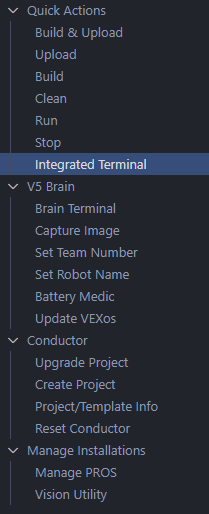
Fetch the File
Type the text below in the terminal, replacing x.x.x with the version of your file. Press Enter.
pros c fetch EZ-Template@x.x.x.zip
Apply EZ-Template to Your Project
Apply EZ-Template to your project by typing below, replacing x.x.x with the version of your file. Press Enter.
pros c apply EZ-Template@x.x.x
You're Done!
That's it! You've now updated to the most recent version of EZ-Template!